Your Pagination Strategy Is Quietly Killing Database Performance
Every backend starts here:
SELECT * FROM products
ORDER BY created_at DESC
LIMIT 20 OFFSET 0;
Then later:
LIMIT 20 OFFSET 100;
Then:
LIMIT 20 OFFSET 10000;
At first, everything feels fine. Spring Data makes pagination trivial:
Page<Product> findAll(Pageable pageable);
The API is clean. The frontend gets page numbers. Product owners are happy. Until production traffic arrives. Suddenly page 1 is fast, page 50 is slower and page 500 turns into a support ticket.
The dangerous part is that nothing looks obviously wrong in the code. The problem only becomes visible when you look at the query plan.
⚡ TL;DR (Quick Recap)
- OFFSET pagination slows down as users navigate deeper into a dataset.
- Keyset pagination uses indexed cursors and keeps performance stable.
- Slice<T> avoids expensive COUNT(*) queries and fits infinite-scroll APIs naturally.
- Query plans reveal exactly how much unnecessary work your database performs.
OFFSET Is Not a “Skip” Operation
This is the misconception that causes most deep paging issues. When the database receives:
SELECT *
FROM orders
ORDER BY id
LIMIT 20 OFFSET 10000;
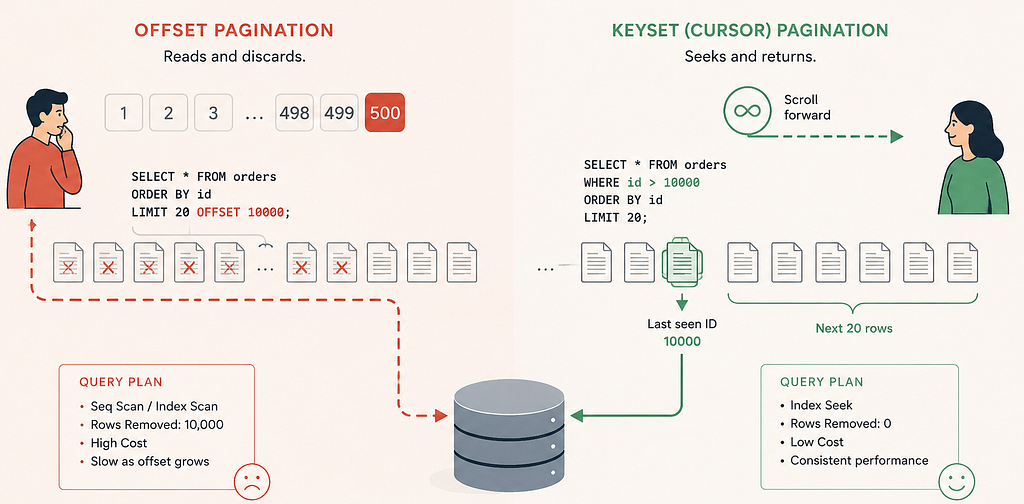
it does not magically jump to row 10,001. Instead, the database:
- Reads the first 10,020 rows
- Sorts or traverses or index scan them (10,000 rows)
- Returns 20
That means your database performed work for 10,020 rows while your application only needed 20. As offsets grow, the wasted work grows linearly.
The Query Plans Don’t Lie
The easiest way to prove this is with EXPLAIN ANALYZE.
Offset Pagination
EXPLAIN ANALYZE
SELECT id, name
FROM products
ORDER BY id
LIMIT 20 OFFSET 50000;
Typical output:
Index Scan using products_pkey on products
(actual time=0.031..812.223 rows=50020 loops=1)
The database still traversed roughly fifty thousand index entries before returning twenty rows. That is the hidden cost of deep paging.
Keyset Pagination Changes the Question
Keyset pagination stops asking:
“Give me page 500.”
Instead, it asks:
“Give me the next 20 rows after ID 50000.”
The query becomes:
SELECT id, name
FROM products
WHERE id > 50000
ORDER BY id
LIMIT 20;
Now the database can jump directly into the B-Tree index.
Query Plan
Index Scan using products_pkey on products
(actual time=0.019..0.052 rows=20 loops=1)
Index Cond: (id > 50000)
The difference is enormous. One query reads 50,020 rows to return 20. The other reads exactly 20 rows to return 20.
Why Keyset Pagination Scales Better
Keyset pagination works because indexes are already ordered structures.
Instead of traversing rows from the beginning, the database seeks directly to the cursor position and continues forward. That keeps latency nearly constant regardless of depth.
In practice:
- Page 1 → fast
- Page 100 → still fast
- Page 10,000 → also fast
This is why most high-scale systems — social feeds, activity timelines, event streams, infinite-scroll APIs — rely on cursor-based navigation.
Spring Data: Page vs Slice
This is where many Spring Boot applications accidentally add extra database cost.
Page<T>
Page<Product> findAll(Pageable pageable);
Page<T> gives you:
- total elements
- total pages
- current page number
- page size
But to calculate totals, Spring Data executes an additional COUNT(*) query.
On large tables, that count can become surprisingly expensive (depending on DB).
Slice<T>
Slice<Product> findByIdGreaterThanOrderByIdAsc(
        Long id,
        Pageable pageable
);
Slice<T> is lighter.
It only answers:
- Is there another page?
- What data belongs to this slice?
No total counts. No expensive aggregate query. For infinite scroll APIs, feeds and sequential navigation, this is often the better trade-off.
JPA/Hibernate — fetches pageable.getPageSize() + 1 rows. If the list size is size + 1, it knows hasNext() is true. Spring Data JDBC or R2DBC, have different internal implementations.
Building a Cursor API in Spring Boot
A simple cursor endpoint looks like this:
GET /api/products?nextCursor=100&size=20
Repository
Slice<Product> findByIdGreaterThanOrderByIdAsc(
        Long id,
        Pageable pageable
);
Generated SQL:
SELECT *
FROM products
WHERE id > ?
ORDER BY id ASC
LIMIT ?
public Slice<@NonNull Product> scroll(String cursor, Pageable pageable) {
    if (!StringUtils.hasLength(cursor)) {
        return repository.findAllByOrderByIdAsc(pageable); // separate query, no WHERE clause
    }
    var lastId = parseCursor(cursor); // handle wrong values
    return repository.findByIdGreaterThanOrderByIdAsc(lastId, pageable);
}
public record ScrollResponse<T>(
List<T> content,
SliceMetadata slice) {}
public record SliceMetadata(
boolean hasNext,
String nextCursor,
Integer size) {}
public ScrollResponse<ProductResponse> toScrollResponse(Slice<@NonNull Product> slice) {
    var items = slice.getContent().stream().map(this::toResponse).toList();
    var nextCursor = slice.hasNext() ? String.valueOf(items.getLast().id()) : null;
    var sliceMetadata = new SliceMetadata(slice.hasNext(), nextCursor, slice.getSize());
    return new ScrollResponse<>(items, sliceMetadata);
}
Example Response
{
  "content": [
    {
      "id": 101,
      "name": "Laptop"
    }
  ],
  "slice": {
    "hasNext": true,
    "nextCursor": "120",
    "size": 20
  }
}
The client simply sends back nextCursor on the next request. No page numbers required.
When OFFSET Pagination Is Still Fine
Classic pagination still makes sense when:
- Users need random page access (cursors are opaque and positional — you can’t compute “cursor for page 500”)
- Admin screens require “jump to page”
- Datasets are relatively small
- Reporting tools depend on total counts
- SEO-driven page URLs matter
Examples:
- admin dashboards
- reporting systems
- search results
- export tools
- CMS back offices
For these workloads, the simplicity of Page<T> can outweigh the cost.
When Keyset Pagination Wins
Cursor-based pagination shines when:
- datasets are large
- users scroll sequentially
- APIs power mobile feeds
- infinite scroll is used
- consistency matters under inserts
- stable latency is critical
Examples:
- activity feeds
- order history
- logs
- audit trails
- event streams
- messaging systems
This is where Slice<T> becomes a natural fit.
A Small But Important Detail: Stable Sorting
Keyset pagination requires deterministic ordering.
This is safe:
ORDER BY created_at DESC, id DESC
This is dangerous:
ORDER BY created_at DESC
If multiple rows share the same timestamp, pagination can skip or duplicate rows.
Always include a unique tie-breaker column.
Usually:
- id
- UUID
- monotonic timestamp
The code example is simplified for ID-only navigation.
The Index Matters More Than the Pagination Strategy
Keyset pagination only works efficiently, when the cursor column is indexed. Without the index, your “fast” keyset query can still degrade into a sequential scan. Always verify with:
EXPLAIN ANALYZE
Never assume the planner is doing what you think it is doing.
Final Takeaways
Pagination is not just an API design concern. It is a database access strategy.
OFFSET pagination is convenient, widely supported and perfectly acceptable for many workloads. But as datasets grow, deep paging becomes increasingly expensive because the database still processes skipped rows.
Keyset pagination changes the problem entirely. By anchoring queries on indexed cursor values, the database can seek directly to the correct position instead of discarding thousands of records first.
The real lesson is not “always use keyset pagination.”
The lesson is:
Read the query plan before choosing your pagination strategy.
You can find example of code on GitHub.
Originally posted on marconak-matej.medium.com.